

Payment guide
Pay with Telegram Stars
The fastest way to get Coins. About a minute, with the card, Apple Pay or Google Pay already on your phone. No crypto wallet, no ID check, and your statement only ever shows Telegram.
 Get CoinsOpens the studio. New here? Sign up in one tap — your first Undress photo and your first image are free.
Six taps, start to finish
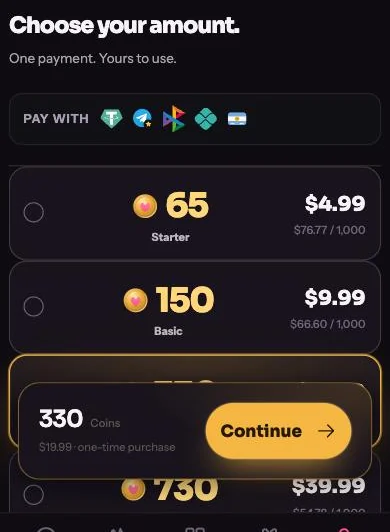
Choose your pack
Open Coins in the studio, pick a pack and tap Continue. Bought Coins never expire.
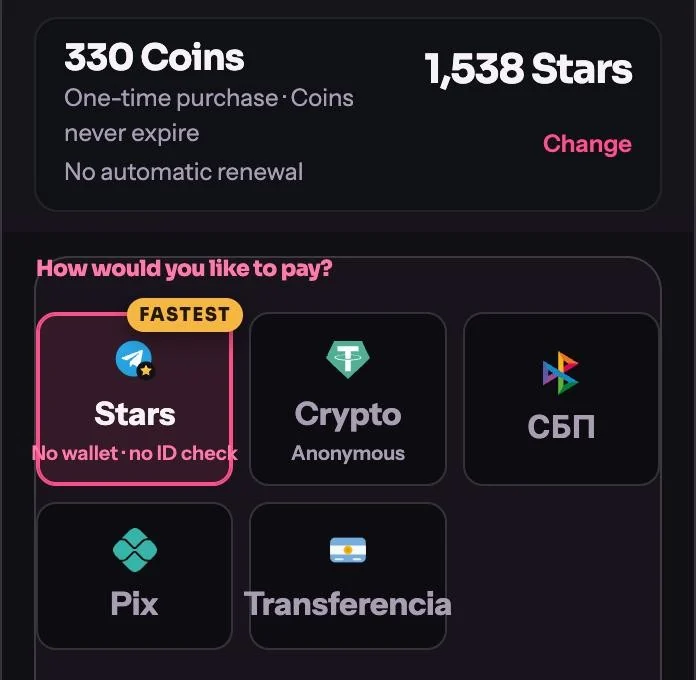
Choose Telegram Stars
Stars is already selected because it is the fastest method. The price in Stars sits next to your pack. Tap Continue in Telegram.
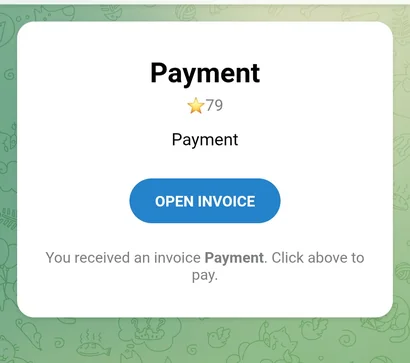
Open the invoice
Telegram opens a chat with our payment bot. That is expected — it handles the Stars payment. Tap Open invoice.
No Stars yet? Buy some
If your balance shows ★0 there are three ways to top up, and any of them works. Easiest: the invoice itself offers Stars packs on the spot — pick the one that covers it and pay with your card, Apple Pay or Google Pay. Or buy them first, before you start: open Telegram Settings and tap My Stars, or message @PremiumBot and send it /stars. Already have enough Stars? This step is skipped.
Confirm and pay
Tap Confirm and pay. Telegram’s own payment sheet takes it from there.
Done
Telegram confirms the transfer and your Coins land in the studio within seconds. Switch back to the app and create.
Good to know
- Enough Stars already? Step 4 disappears and you pay in two taps.
- Stars never expire. Anything left over stays in your Telegram account for next time.
- Your statement shows Telegram, Apple or Google. Never our name.
- Works the same on phone and desktop Telegram.
- Coins not there after a minute? Write to support with your Telegram receipt and we sort it out fast.
Get Coins